

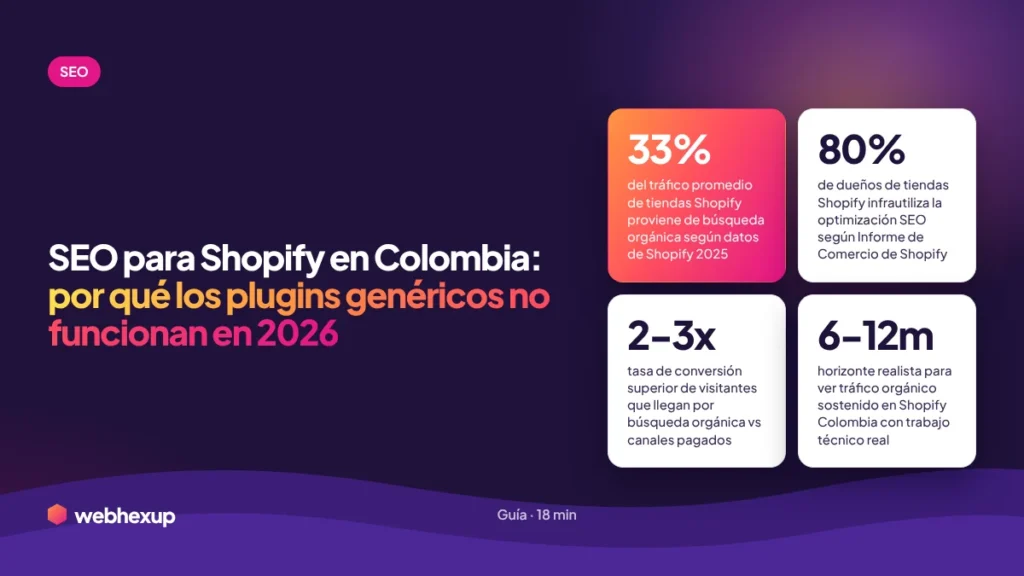
The most common advice given to Colombian e-commerce businesses: “Install this Shopify SEO app, and that’s it—your store is optimized.” I’ve seen this happen dozens of times. The store installs SearchPie, TinyIMG, or SEO Booster, pays $30–$80 a month for a year, and organic traffic doesn’t go up. Because real Shopify SEO isn’t solved with a plugin—it’s solved by understanding how the platform behaves in the Colombian market and what needs to be done manually.
I’ve been working on SEO for Colombian e-commerce for years—Shopify, WooCommerce, VTEX, and PrestaShop. And with Shopify, history repeats itself: the client comes in with 5–8 SEO apps installed, a theme purchased on ThemeForest, 200 products published with descriptions copied from the supplier, and frustration the size of Poblado because “Google doesn’t see me.” The problem is almost never what the apps do—it’s what nobody did first.
This article provides a realistic framework for how to rank a Shopify store in Colombia. No “10 must-have apps” lists that every article repeats. Just what works when thousands of pesos are at stake every month—based on my own projects, not on theories from international blogs that don’t understand the local market.
Why Do Generic
SEO Plugins Fail on Shopify Colombia?
Let’s talk about what nobody mentions in international guru blogs. Shopify SEO apps—SearchPie, TinyIMG, SEO Booster, AVADA, Plug In SEO, StoreSEO—are designed to solve specific, repeatable tasks: generating automatic meta titles, compressing images, installing basic JSON-LD, and detecting broken links. They all do what they promise. The problem isn’t what they do—it’s what they don’t do, and what the store owner assumes they are doing.
A plugin doesn’t determine your store’s architecture. It doesn’t choose which collections are a priority for your market. It doesn’t conduct keyword research specific to Colombia—taking into account the differences in vocabulary between Mexico, Spain, and Argentina. It doesn’t write product descriptions that target actual purchase intent. It doesn’t build internal links using thematic clustering logic. It doesn’t make the strategic decision about which URLs to index and which not to. And all those decisions are what drive search rankings—not the auto-generated meta title.
What I see in audits of Colombian Shopify stores that have 5–8 SEO apps installed is a paradox: the site has all the technical trappings (Product Schema, XML sitemap, WebP images, meta descriptions on every page) and yet it has three structural problems that no plugin addresses. Products with descriptions identical to those of the supplier. Collections not optimized for transactional searches. Zero blog content to capture informational searches. Zero optimization of the Google Business Profile if the store has a local component.
On top of that, many SEO apps create a secondary problem that almost no one measures: each app loads additional scripts into the frontend that slow down the site. According to research documented by SEO Marketing Köln, the “uncontrolled growth of apps” is one of the biggest performance issues on Shopify. Your store may have TinyIMG optimizing images, but if doing so requires loading 5 extra scripts that add 800 ms to the LCP, the net result is negative. Core Web Vitals are a direct ranking factor—and no SEO app is going to prioritize them over its own functionality.
The point isn’t “don’t use apps.” It’s “don’t rely on apps to make strategic decisions that are ultimately human decisions.” Good apps—StoreSEO, JSON-LD for SEO, TinyIMG used judiciously—are useful tools within a strategy. Without a strategy, they’re dead weight that costs you a monthly fee.
The real limitations of Shopify
that affect SEO in Colombia.
Shopify is an excellent platform for building sites quickly, but it has structural limitations you can’t ignore if you want to rank in 2026. Recognizing them isn’t being negative—it’s the first step toward working within them intelligently.
The first limitation is the enforced URL structure. Shopify requires you to place your products at /products/nombre-producto/ and your categories at /collections/nombre-coleccion/. You can’t host products directly from the root directory or create your own URL architecture. This has two consequences: on the one hand, it provides automatic consistency for Google crawling; on the other, it results in slightly longer and less flexible URLs. It works perfectly well, but anyone coming from WordPress with custom permalinks will struggle at first.
The second limitation is duplicate content for products with variants. If you have a “Basic T-shirt” product available in sizes S, M, L, and XL and colors red, blue, black, and white, Shopify can generate up to 16 different URLs for the same product. Each combination has its own URL. Without properly configuring canonical tags, you’re asking Google to crawl 16 nearly identical pages. Crawl budget is wasted, and rankings are diluted. This is a critical technical issue that no standard SEO app can resolve on its own—it requires manual review of the theme’s configuration.
The third limitation directly affects Colombia: the robots.txt tag comes with restrictions. Although Shopify allows you to edit it in the latest version, certain directories remain blocked by default—/search, /cart, /checkout. This is fine for most cases, but it can cause problems when you want to implement advanced strategies such as indexing internal search results for long-tail keywords. As Josep Deulofeu explains in his 2026 Shopify SEO guide, managing product variants and duplicate URLs requires technical decisions that go beyond any settings panel.
The fourth limitation—and the one most often overlooked in Colombia—is that the XML sitemap is rigid. Shopify generates it automatically, which is convenient, but it doesn’t let you exclude specific pages or customize what gets indexed and what doesn’t. If you have a collection with three products that have low SEO value and dilute your authority, you can’t remove it from the sitemap without manual workarounds. This is a hindrance when scaling your catalog.
The fifth limitation, specific to Colombia, is integration with local payment gateways. Shopify integrates with Wompi, PayU Colombia, ePayco, and Bold, but each integration adds scripts to the checkout that affect performance. It’s not a direct SEO issue, but it does affect the user experience as measured by Google through metrics like dwell time and post-purchase bounce rate. Optimizing the checkout for Colombia requires specific decisions about which payment gateway to prioritize based on the audience—and those decisions have an indirect impact on SEO.
A real technical strategy for
Shopify in the Colombian market.
The technical foundation of a well-optimized Shopify store doesn’t come from installing apps—it comes from informed decisions about content, content architecture, schema markup, and performance. This is the actual checklist we use when auditing a Colombian store before offering our services.
First, choosing a theme. Not all Shopify themes perform equally well on Core Web Vitals. Lighter themes (Dawn, Sense, Ride, Spotlight) load faster but have fewer visual features. Heavy themes (Impulse, Turbo, Prestige, Warehouse) have more pre-built blocks but can result in PageSpeed scores below 40 on mobile. The Dwell theme, which we’ve used with clients in Colombia, strikes a good balance for fashion and accessories—it offers enough sections without loading 2MB of unnecessary JavaScript. The theme you choose defines the upper limit of possible performance before you’ve even installed a single app.
Second, schema markup configuration. Shopify automatically generates basic schema—Product, Offer, AggregateRating if there are reviews—but does not generate advanced schema such as BreadcrumbList, FAQPage on product pages, or Organization at the store level. For a Colombian Shopify store targeting AI Overviews and LLMs, the Product schema enriched with brand, mpn, gtin, sku, availability, and priceCurrency (COP) is a key differentiator. This is implemented by editing the theme’s product.liquid file or by manually injecting JSON-LD via theme.liquid.
| Technical Element | Default Shopify | Actual Optimization for Colombia |
|---|---|---|
| Product Schema | Basic, auto-generated | Enriched with brand, MPN, GTIN, SKU, priceCurrency COP |
| Canonical tags on variants | Partial | Manually forced to the main product |
| /collections/ and /products/ URLs | Fixed and immutable | Slugs optimized with the main keyword |
| Meta descriptions | Auto-generated | Handwritten for each product and collection |
| Alt text for images | Empty | Descriptive with natural keywords per image |
| XML Sitemap | Rigidly auto-generated | Reviewed — manual exclusion of low-authority pages |
| robots.txt | Default blocked | Edited according to specific architecture |
| hreflang es-CO | Not configured | Configured if there are international sales |
| Core Web Vitals | Varies by theme | LCP under 2.5s, CLS under 0.1, INP under 200ms |
| 301 Redirects | Manual per URL | Systematically mapped when changing slugs |
Third, images. Shopify automatically serves WebP from the CDN cache, which is fine, but many store owners upload 5–10MB originals thinking that Shopify “will take care of it.” That’s not the case—if the raw file size is large, processing and download times will still be slow. True optimization means: uploading pre-compressed images (maximum 300–500 KB per product image before it enters the CDN), correct dimensions (1200x1200px for products, no more), and descriptive alt text with natural keywords—never keyword stuffing. This is pure on-page SEO that no app can automate well because it requires human context about the product.
Fourth, the structure of collections. Shopify allows you to create automatic collections by tag, product type, or supplier. The mistake I see is creating dozens of weak collections—collections with 2–3 products, collections with ambiguous names, and duplicate collections due to tag differences. Every collection you index should have at least 8–15 products, an H1 tag with the main keyword, a 150–300-word description above the product grid (not below—above, where Google reads it first), internal links to other related collections, and the BreadcrumbList schema configured. A collection without these elements is dead weight that dilutes authority.
Content: Collections, products, and blog
for Shopify in Colombia.
Most Colombian Shopify stores have a content problem that apps can’t fix: product descriptions copied from the supplier, collections with just a name and nothing else, and an empty blog or one with articles from 2021. This is the work that really drives search rankings in 2026.
Collections are your most valuable SEO asset on Shopify—more so than individual products in most niches. When someone searches for “casual summer dresses” in Colombia, Google prefers to show a well-structured collection page rather than a specific product. The collection captures the category intent. The product captures the final purchase intent. But the battle in the Colombian SERP is fought first in the collections—and that’s where most stores unwittingly give up on organic rankings.
For a Shopify collection to perform well in SEO in Colombia, it needs five manually optimized elements: an H1 tag with a real transactional keyword (“Casual Dresses for Women in Medellín”), a 200–400-word introductory description with semantic and LSI keywords above the product grid, a second content block at the bottom of the page with a buying guide or FAQs, contextual internal links to other related collections and the blog, and a configured BreadcrumbList schema. Without these five elements, the collection is just a showcase—and showcases don’t rank on Google in 2026.
For individual products, the rule is to replace the supplier’s description. Any product published with the manufacturer’s default description is already listed on 50 Colombian stores and 200 international stores. Google detects duplicate content and doesn’t rank any of them. The only solution is to write your own description—it doesn’t need to be long, but it does need to be specific: materials, real-world uses, compatibility with other products, what sets your store apart, shipping within Colombia, and warranty. Between 100 and 250 original words per product is more useful than 800 words copied from the supplier.
The Shopify blog is where you capture informational intent—people who are researching before making a purchase. According to Shopify’s own team in its official SEO guide, blog content is one of the three pillars of optimization. In Colombia, the opportunity is even greater: many niches have weak competitor blogs, and you can rank quickly with 10–15 well-executed articles. Topics such as buying guides (“how to choose X”), comparisons (“X vs. Y”), tutorials (“how to use X”), and local trends (“2026 trends in X for Colombia”) capture informational searches that then drive traffic to collections and products through well-crafted internal links.
There’s one additional tactic that almost no one implements on Shopify Colombia: “linkable mini-blogs” within collection descriptions. These are 150–200-word text blocks in each collection that answer frequently asked questions about the product and link back to the main blog. This builds internal topical authority and improves the ranking of both the collection and the blog post. It’s manual work, yes—but it’s work that an app can’t do because it requires understanding your product and your customer.
Local SEO + AEO for Colombian Shopify stores
.
If your Shopify store has a local component—a physical location in Medellín, Bogotá, or Cali—local SEO is the most underrated lever. A properly configured Google Business Profile can generate 40–120 organic calls or visits per month in major Colombian cities, without spending a single peso on ads. And leads from GBP convert at significantly higher rates than those from paid social media because they already come with active purchase intent.
Proper GBP setup for a Colombian Shopify store includes: an accurate primary category (Clothing Store, Beauty Store, etc.), complete secondary categories, monthly updated photos of products and the store location, weekly posts featuring new products, responding to positive and negative reviews within 48 hours, links from the listing to specific collections on the site (not just the homepage), configured accessibility attributes, and a LocalBusiness schema on the website with an address, phone number, and hours consistent with those on GBP. NAP (Name, Address, Phone) consistency is a direct local ranking factor.
AEO—Answer Engine Optimization—is changing how people shop online in Colombia. Users no longer go to Google and click on 5 results. They ask ChatGPT, Perplexity, or Gemini, “Where can I buy X in Medellín?” and expect a direct answer. Stores mentioned in those answers gain qualified traffic without paying per click. Specific optimization work for generative AI on Shopify includes: structuring product descriptions with an implicit question-and-answer format, creating FAQs in collections with quotable 40–60-word answers, implementing FAQPage and Product schema markup, publishing comparative buying guides that LLMs can use as a source, and ensuring that key product information (price, availability, shipping to Colombia, warranty) is unambiguously extractable.
One detail that almost no one is working on in Shopify Colombia: the llms.txt file. According to data from StoreSEO 2026, more than 2,200 stores implemented this file in 2025 to guide ChatGPT, Gemini, Grok, and Claude on which content to prioritize. It’s a domain-root declaration that works similarly to robots.txt but is specific to language models. Colombia still has an early-adoption window for this—stores that implement it in 2026 will have a real advantage over competitors who don’t even know it exists.
The 5 Most Common Mistakes on
Shopify in Colombia (and How to Avoid Them).
This is the number one mistake and the one that most severely hurts SEO performance for Colombian Shopify stores. When you copy the description provided by the supplier, you’re publishing content that already exists on 30–200 other stores. Google penalizes duplicate content and stops showing your store for relevant keywords. The solution is time-consuming but non-negotiable: manually rewrite each description, prioritizing first the products that generate the most revenue or those with the highest search volume. You don’t have to do the entire catalog in the first month—but you do need to cover the top 30 products.
More apps don’t mean better SEO—they mean more scripts loading on your frontend. Each additional app worsens your Core Web Vitals by 100–400 ms in LCP. And many apps perform overlapping functions: 3 apps generating schema, 2 apps compressing images, 2 apps optimizing meta tags. The recommendation is: one app for advanced schema if your theme doesn’t include it, one for image compression if done right, and one for a sitemap if you need extra control. Three at most—and only if each one performs a function you know you need.
The blog on Shopify Colombia is the most underrated lever. Most stores publish 2–3 articles at launch and then abandon it. In 2026, Google and LLMs will prioritize fresh, in-depth, and useful content—a blog with 15–25 well-executed articles can generate more organic traffic than the entire product section combined. And that informational traffic directed toward collections and products converts at high rates because it comes from the bottom of the funnel with trust already established.
A Shopify store in Colombia that only accepts credit/debit cards as a payment method is leaving 20–40% of sales on the table. In Colombia, conversion rates are high for PSE, Nequi, Daviplata, Bold, Wompi, and cash on delivery. This isn’t a direct SEO issue, but it affects the post-click experience and the behavioral signals Google uses for ranking. A site where people land but don’t complete a purchase due to a lack of local payment methods has high bounce rates and short session durations—two negative signals that impact overall ranking.
Collections are Shopify’s number one SEO asset in Colombia. They capture high-volume category searches (“casual dresses,” “white sneakers,” “vegan cosmetics”). However, most stores have collections with no content—just a product grid with no description, no optimized H1, and no guidance blocks. Optimizing the top 10–15 collections can drive more organic traffic in 6 months than optimizing 300 individual products. Prioritize collections first, products second.
Shopify Colombia by City:
Market Context.
📍 Medellín · Valle de Aburrá
Medellín has a high concentration of Shopify stores in fashion, beauty, and crafts—significant competition but also a large market. The SEO window remains open in specific niches: sustainable fashion, Colombian design brands, and products handmade in Colombia. Local SEO combined with Google Business Profile works exceptionally well for stores with physical showrooms in El Poblado, Laureles, and Envigado. Our SEO agency in Medellín specializes in local e-commerce.
📍 Bogotá · Capital Region
Bogotá is the largest and most competitive market for Shopify Colombia. Meta Ads campaigns have higher CPAs, making organic SEO an even more profitable long-term investment. Geographic granularity matters—stores with showrooms in Chicó, Usaquén, or Chapinero capture specific local searches with less competition than generic keywords like “Bogotá.” Our SEO agency in Bogotá handles the intense competition in the capital.
📍 Cali · Barranquilla · Mid-sized Cities
In Cali, Barranquilla, Cartagena, Pereira, and Bucaramanga, SEO competition on Shopify is significantly lower than in Medellín and Bogotá. A store that effectively implements the technical, content, and local fundamentals can rank for niche commercial keywords within 4–7 months. Nationwide shipping from these cities is also a differentiator that can be leveraged in SEO through dedicated “Shipping to [city]” pages that capture searches with specific intent. We provide SEO services throughout Colombia, covering every city in the country.
Frequently asked questions about
SEO for Shopify in Colombia.
Is Shopify good for SEO in Colombia?
Yes, Shopify is a viable platform for SEO in Colombia, but it has structural limitations that restrict its flexibility compared to WooCommerce or more open platforms. Shopify’s strengths include speed, managed hosting, and automatic basic schema. Its limitations include forced URLs ending in /products/ and /collections/, a rigid sitemap, and a restrictive robots.txt file. With the right strategy, Shopify competes effectively in Colombian SERPs—but it requires manual technical work that no plugin can fully handle.
What are the best SEO apps for Shopify in Colombia?
It depends on your store’s specific needs. For advanced schema markup, JSON-LD for SEO works well. For image compression, TinyIMG. For basic SEO diagnostics and audits, StoreSEO or SearchPie. The important rule: don’t install more than 3 SEO apps at the same time to avoid impacting performance. And no app can replace the manual work of keyword research, writing product descriptions, optimizing collections, and creating blog posts. Apps are a complement—not a substitute.
Is WordPress with WooCommerce better for SEO than Shopify?
WooCommerce offers more technical flexibility and control over URLs, schema, sitemaps, and advanced SEO plugins like Yoast or Rank Math. Shopify is more closed-off but easier to maintain and has better technical performance by default. The real answer: SEO strategy, content, and domain authority carry more weight than the chosen platform. A well-optimized Shopify site outperforms a poorly implemented WooCommerce site—and vice versa. Choosing a platform based solely on SEO only makes sense when the team has the technical capability to take advantage of WooCommerce’s flexibility.
How long does it take for SEO on Shopify to show results?
In moderately competitive Colombian markets, the first visible results appear within 4–7 months with consistent technical and content efforts. In highly competitive markets (fashion, beauty, electronics), it can take 8–14 months to see significant traffic. The break-even point relative to the initial investment is typically reached in months 10–14. Factors that accelerate results include consistent blog content, effective collection optimization, well-executed internal linking, and optimal Core Web Vitals from the start.
How to integrate SEO with Meta Ads on Shopify Colombia?
The correct approach is to use data from Meta Ads campaigns to inform your SEO strategy. Which products have the best ROAS, which audiences respond best, and which messages drive conversions—this information should guide which collections to prioritize for SEO, which keywords to target in blog posts, and what content to create. At the same time, organic SEO builds the assets that reduce reliance on paid advertising in the long term. Our Meta Ads campaigns are always designed to be integrated with the SEO strategy for maximum ROI.
Does Shopify allow you to appear on ChatGPT and Perplexity?
Yes, but it requires specific AEO and GEO work. Shopify stores cited in ChatGPT, Perplexity, or Gemini have three things in common: a Product schema enriched with complete and verifiable information, product descriptions in an implicit question-and-answer format that LLMs can extract, and blog content with real authority (not generic). The implementation of the llms.txt file is also gaining traction as a direct signal to LLMs about which content to prioritize.
How much does Webhexup’s Shopify SEO service cost?
Our e-commerce SEO services are organized into plans based on catalog size, niche competition, and target traffic volume. You can view the general price ranges on our pricing page or schedule a free diagnostic call where we’ll provide an exact proposal for your Shopify store based on your specific situation.


