
navigator.modelContext API. Instead of an agent taking screenshots and guessing where to click, your website publishes a “Tool Contract” that the agent reads and executes precisely. It doesn’t replace SEO, AEO, or GEO—it’s an action layer that complements the visibility layer. In this guide, I’ll explain what it is, how it connects all these disciplines, and how to implement it based on your niche market.If you’ve been hearing a jumble of acronyms (SEO, AEO, GEO, AIO, SXO, LLMO) for months and now WebMCP comes along, it’s normal to feel like the ground is shifting every week. The good news: WebMCP isn’t just another discipline competing with the others. It’s the piece that connects them all. While SEO, AEO, and GEO ensure your brand is found and referenced, WebMCP makes your site actionable by AI agents that—following Google I/O 2026—are already crawling the web on behalf of users.
This guide is designed for CEOs, marketing directors, developers, and business owners in Latin America who need to understand what has changed with WebMCP and how to apply it specifically to their type of business. If, after reading this, you’d like to implement it with guidance, Webhexup offers SEO + GEO + AI Visibility services that already include the agent-readiness layer.
What exactly is WebMCP
, and why did Google release it?
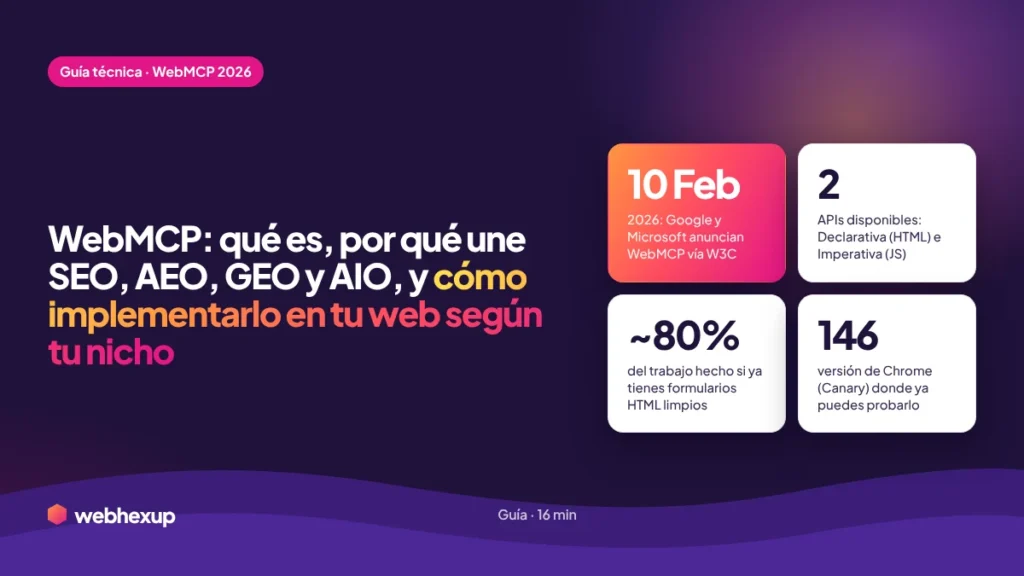
WebMCP (Web Model Context Protocol) is a browser standard that allows your website to expose its functions as structured tools that can be executed directly by AI agents. Instead of an agent parsing the DOM or taking screenshots to figure out what each button does, your website publishes a clear contract: these are the available actions, these are the parameters I need, and this is how they’re used. It was announced on February 10, 2026, by the teams at Google and Microsoft, and developed within the W3C’s Web Machine Learning group.
The clearest analogy is that of a restaurant menu. Without a menu, the waiter has to guess what you want to eat. With a menu, you point and say, “I’ll have number 3.” WebMCP is the menu that your site provides to AI agents. Until now, agents interacted with websites in two unreliable ways: visually (through screenshots interpreted by a computer vision model) or by analyzing HTML code—both methods are slow, token-intensive, and prone to breaking with any design changes.
Why did Google launch it right now?
Because without this layer, the entire agent-based vision that Google presented at I/O 2026—agents that monitor the web 24/7, Gemini Spark, and the Universal Cart that shops for you—isn’t technically viable at scale. Agents need a reliable and fast way to perform real actions on real websites: booking, purchasing, filtering, scheduling. WebMCP is the infrastructure that makes this possible. As Search Engine Land summarized in its 2026 SEO predictions, SEO is becoming two distinct tasks: attracting clicks from humans and providing clean, reliable inputs to AI agents who may never actually visit your site.
It’s important to note the current status: WebMCP is in early preview, available only in Chrome 146 Canary behind the “WebMCP for testing” flag, and isn’t ready for production yet. But the direction is unmistakable. This ties directly into what we documented in our analysis of Google I/O 2026 and the shift toward AI-powered search.
Is it the same as Anthropic’s MCP?
No, and the difference matters.
“I’d already heard of MCP with Anthropic’s Claude. Is WebMCP just the same thing with a different name, or is it something different that I need to learn separately?”
WebMCP and Anthropic’s MCP (Model Context Protocol) share inspiration and a name, but they are different things that solve different problems. Anthropic’s MCP runs on the server side: it connects AI platforms with service providers through backend integrations. WebMCP runs entirely on the client side, within the browser tab. A simple way to remember this: MCP is for when no human is watching; WebMCP is for when the user is right there, ready to step in if something goes wrong.
They don’t compete—they coexist and serve different use cases. Anthropic’s MCP is ideal for background automations between systems. WebMCP is ideal for user-visible tasks, with the human in the loop, on a live web page. For a LATAM company, the key point is that both can be part of a strategy for AI agents, but WebMCP is the one that directly affects your public website.
How does WebMCP connect with
SEO, AEO, GEO, AIO, SXO, and LLMO?
“A new acronym pops up every week. Does WebMCP replace SEO? Do I have to choose between doing GEO or WebMCP? How does all this fit together?”
This is the most important question, and the answer alleviates a lot of anxiety: WebMCP doesn’t replace any of these disciplines. It complements them. Each acronym addresses a different layer of the same goal, which is to exist and function on the web of AI agents. Think of it as a funnel: first, they have to find you; then, they have to engage with you; and finally, they have to be able to take action on your site. WebMCP is that final layer of action.
The right way to look at it: SEO, AEO, GEO, AIO, SXO, and LLMO focus on visibility (being found and cited). WebMCP focuses on actionability (enabling users to perform actions on your site). A comprehensive strategy in 2026 requires both layers. To build the first layer, I recommend our guide on OMG: Optimization for Generative Engines and the Entity Map methodology.
How does it work technically?
An explanation of the two APIs.
WebMCP introduces a browser API called navigator.modelContext and offers two complementary ways to expose your site’s tools. The choice between the two depends on how complex the actions you want to enable are. For most LATAM companies with well-designed forms, the first approach covers 80% of the work with very little effort.
Method 1 — Declarative API (the simplest)
This is the fastest way to get started. Instead of writing JavaScript, you annotate your existing HTML forms with special attributes. The browser automatically generates the “contract” that the agent reads. If your forms are already clean and well-structured, you’re probably already 80% of the way there. For example, to a search form, you add:
<!-- API Declarativa: anotar un formulario existente -->
<form toolname="buscarProductos"
      tooldescription="Busca productos en el catálogo por palabra clave">
  <input name="query" type="text" />
  <button type="submit">Buscar</button>
</form>
Method 2 — Imperative API (for complex actions)
For dynamic, multi-step interactions, you register tools with JavaScript using the registerTool() method. Each tool is given a name, an agent-readable description, an input schema in JSON Schema (draft-07) format, and a execute function that runs when the agent calls it. You should always first verify that the browser supports the API:
// API Imperativa: registrar una herramienta con JavaScript
if ("modelContext" in navigator) {
  navigator.modelContext.registerTool({
    name: "reservarCita",
    description: "Agenda una cita en la fecha y servicio indicados",
    inputSchema: {
      type: "object",
      properties: {
        servicio: { type: "string" },
        fecha: { type: "string" }
      }
    },
    async execute(params) {
      // tu lógica de reserva aquí
      return { content: [{ type: "text", text: "Cita confirmada" }] };
    }
  });
}
The security model is key: the browser acts as a secure proxy that requires user confirmation before an agent can perform sensitive actions, and enforces the same-origin policy, Content Security Policy, and HTTPS. The user always retains control. A technical note for developers: opening an HTML file directly with file:// fails silently; you need a local server (any server will do). For debugging, the Model Context Tool Inspector extension is available in the Chrome Web Store.
How do I implement WebMCP
step by step on my website?
Although WebMCP is in preview, getting ready now gives you a huge structural advantage over competitors who will wait until it’s stable. Here’s the path I recommend for companies in Latin America, ordered from least to most complex:
- Sign up for the WebMCP Early Preview Program through the Chrome Developer Portal to access official documentation, demos, and tools like the Model Context Tool Inspector.
- Start with the Declarative API: add the attributes
toolnameandtooldescriptionto your existing HTML forms (search, contact, booking, checkout). This is the fastest approach and has the greatest immediate impact. - Clean up your forms first: if your form HTML is messy, organize it. A clean form already does 80% of the work for WebMCP.
- Use the Imperative API for complex workflows: multi-step processes, dynamic filters, and checkouts with conditional logic. Design Tool Contracts with descriptive names and clear parameters.
- Combine WebMCP with schema.org: the structured data layer and the actions layer reinforce each other. A site with good schema and good WebMCP is maximally readable and executable.
- Ensure your authentication flows are bot-friendly: avoid CAPTCHAs that block legitimate bots from performing actions you want to enable.
- Test everything in staging before going live and monitor AI-referred traffic in Search Console.
A strategic point highlighted by industry analysis: the technical layer of AI readiness (entity structure, schema, and WebMCP’s Tool Contracts architecture) falls into a gap that neither traditional content agencies nor conventional SEO teams are yet filling. That gap is precisely the opportunity for whoever acts first.
How do I apply WebMCP
based on my market niche?
WebMCP isn’t implemented the same way in an online store as it is in a clinic or a law firm. The actions you want to expose to agents depend on your business model. Here are the specific use cases by niche, along with the tools that would make sense to publish in each one:
Online Stores and Retail
This is the niche with the greatest immediate impact, especially with Google’s Universal Cart comparing prices in real time. Recommended tools: buscarProductos, filtrarPorCategoria, añadirAlCarrito, consultarStock, <img id="5"/>, aplicarCupon, checkout.
Strategic key: With agents automatically comparing prices, your product listing must stand out based on value proposition, brand attributes, and rich structured data—not just price. The cheapest product doesn’t always win; the winner is the one that best explains why it’s worth it.
Clinics, medical offices, and healthcare services
Recommended tools: verDisponibilidad, agendarCita, consultarEspecialidades, solicitarInformacion. A patient can ask their agent, “Schedule me a physical therapy appointment for Thursday,” and the agent will book it right away.
Strategic Key: In YMYL (health) sectors, trust is everything. Combine WebMCP with strong E-E-A-T signals (doctors with verifiable credentials as entities) so that the agent trusts your site when performing sensitive actions.
Lawyers, accountants, consultants, agencies
Recommended tools: solicitarConsulta, agendarReunion, cotizarServicio, descargarRecurso. The B2B sales funnel shortens when an agent can schedule the first meeting seamlessly.
Strategic Key: 89% of B2B buyers already use AI to research suppliers. If your agent can schedule the initial consultation directly, you capture the lead before a competitor who requires filling out three forms.
Hotels, Tours, and Experiences
Recommended tools: consultarDisponibilidad, reservarHabitacion, buscarTours, cotizarFechas. An international traveler can book directly through a conversation with their agent without going through Booking.
Strategic Key: Competing against the big aggregators (Booking, Airbnb) requires that your direct booking process be just as seamless for an agent as theirs. WebMCP levels the playing field if you implement it correctly.
Software, platforms, and tools
Recommended tools: iniciarPrueba, compararPlanes, solicitarDemo, consultarDocumentacion. Users can activate a free trial or schedule a demo by chatting with their agent.
Strategic Key: SaaS is the most natural niche for WebMCP because it already thinks in terms of functions and APIs. Presenting your core actions as tools is a logical extension of your product.
The general rule per niche: Identify the 3 to 5 actions your customers most want to perform on your site and start by presenting those as tools. Don’t try to map everything at once. Start with the action that has the highest commercial value (book, buy, schedule, get a quote) and expand from there.
Common mistakes when
implementing WebMCP.
Believing that WebMCP replaces SEO
It does not replace it. If an agent can’t find or trust your site (visibility layer), it’s useless that they can perform actions (WebMCP layer). You need both layers working together.
Confusing it with Anthropic’s MCP
They are different protocols. WebMCP is client-side (in the browser, with the user present); Anthropic’s MCP is server-side (backend, without a human watching). Implementing one does not mean you’ve implemented the other.
Waiting for it to be stable before getting started
Even though it’s in preview, getting ready now (cleaning up forms, organizing the schema, designing Tool Contracts) gives you a structural advantage. Anyone who waits until it’s stable to get started is already behind.
Mapping all actions at once
Start with the 3–5 actions with the highest commercial value (buy, reserve, schedule, get a quote). Trying to expose every function on the site at once results in confusing Tool Contracts that agents misuse.
The Essentials of WebMCP
for LATAM Businesses in 2026.
WebMCP (Web Model Context Protocol) is a browser standard announced by Google and Microsoft on February 10, 2026, through the W3C, which allows your website to expose its functions as structured tools that can be executed by AI agents. Instead of an agent having to guess where to click, your website publishes a “Tool Contract” that the agent reads and executes precisely. It works through the `navigator.modelContext` API, available in Chrome 146 Canary. It does not replace SEO, AEO, or GEO: it is the action layer that complements the visibility layer.
WebMCP connects with the other disciplines as follows: SEO, AEO, GEO, AIO, SXO, and LLMO work on visibility (ensuring your brand is found, cited, and interpreted), while WebMCP focuses on actionability (ensuring an agent can book, purchase, filter, or schedule on your site). A comprehensive strategy in 2026 requires both layers. WebMCP is not the same as Anthropic’s MCP: WebMCP runs client-side in the browser with the user present, while Anthropic’s MCP runs server-side in the backend.
There are two APIs for implementation: the Declarative API (annotating HTML forms with the `toolname` and `tooldescription` attributes, which covers 80% of cases if your forms are well-structured) and the Imperative API (registering tools with JavaScript via `registerTool()` and JSON Schema for complex workflows). The application varies by niche: e-commerce includes search/add to cart/checkout; healthcare includes schedule an appointment/view availability; professional services include request a consultation/schedule a meeting; tourism includes book/check availability; SaaS includes start a trial/request a demo. The recommendation is to start with the 3–5 actions with the highest commercial value.
We answer your questions about
WebMCP and the web for agents.
José Fernando Muñoz Álvarez
SEO consultant with nearly 20 years of experience in digital marketing in Colombia and the United States, specializing in AI Visibility and preparing websites for AI agents in the Latin American market. Founder of Webhexup. Previously co-founder of Eggs Blogs Casa Creativa and e-ideas Digital Agency. He publicly documents the transition to the agent-driven web (WebMCP, GEO, AI Mode) on LinkedIn (jfmonin).